




n8n workflow search — any data sources as a research pipeline.
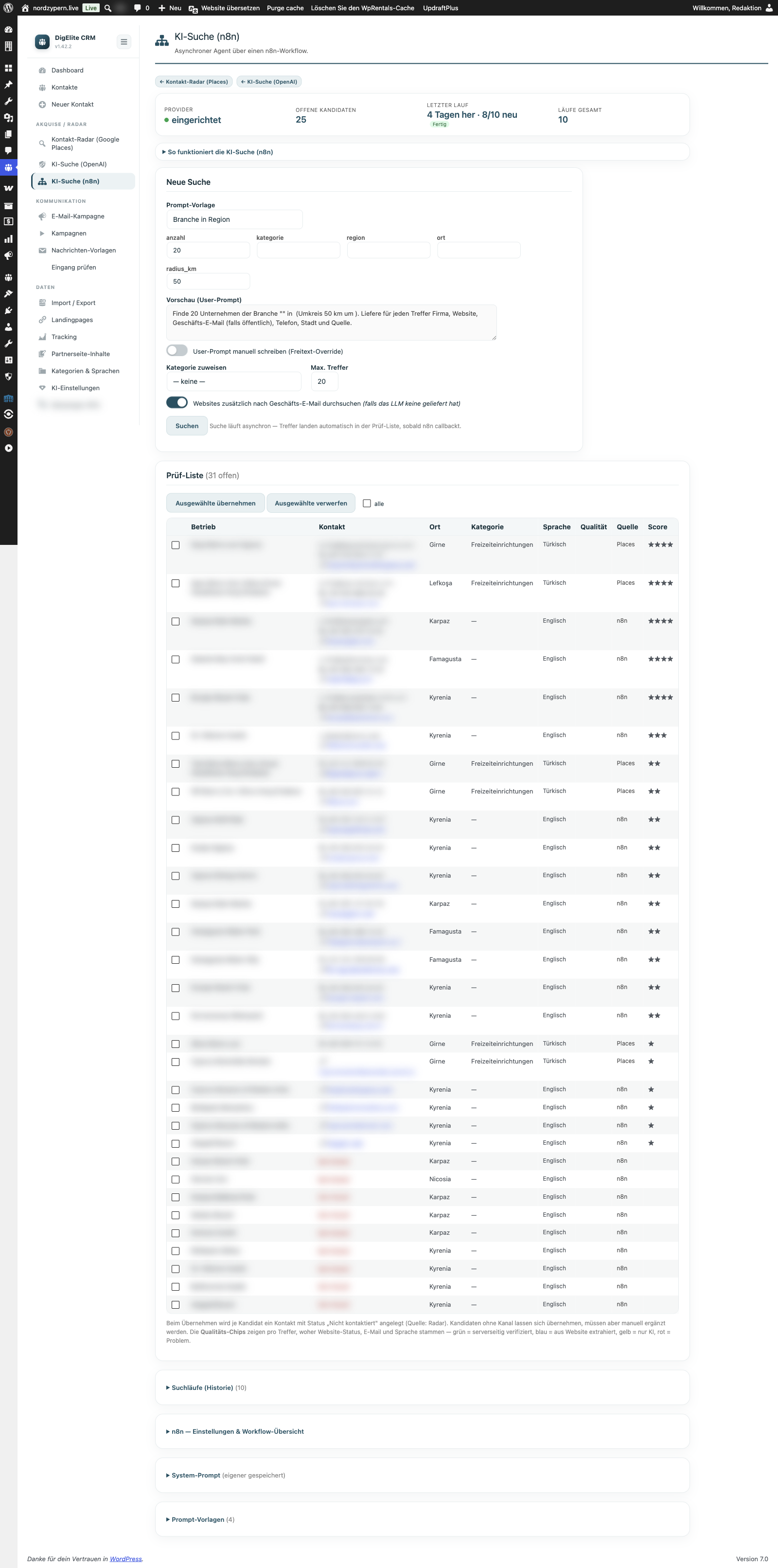
DigElite CRM provides a webhook endpoint that accepts any n8n workflow as a research source—from LinkedIn scrapers and industry directories to the customer's own database. Matches are automatically added to the candidate list, deduplicated against the existing database. n8n workflows run on the customer's infrastructure—no central marketplace, no per-run license fees.
In-depth research without CRM lock-in.
If contact radar (Google Places) and AI search (OpenAI) are too generic for your use case, n8n takes over: Workflow chains that scan LinkedIn profiles, scour industry directories or enrich your own inventory data — and in the end, the results land in the CRM without any manual copying required.
Webhook endpoint in CRM
A dedicated endpoint (`/wp-json/nz_crm/v1/candidates/n8n`) accepts n8n matches. Auth via bearer token, payload as JSON.
Any data source can be connected.
LinkedIn scraper, Crunchbase, industry directories, own Excel/MySQL databases — everything that connects n8n can be integrated into the CRM.
Dedupe + candidate mapping
Matches are compared against the existing contact database and mapped into the CRM candidate schema — status „not_contacted", source „n8n-Workflow-Name".
From workflow development to candidate management in the CRM.
Build an n8n workflow
Build any research pipeline in n8n — feel free to use our example workflows as a template (LinkedIn, industry directory, AI filter).
Configure webhook
Generate tokens in the CRM backend and store them in the n8n HTTP request node. Payload is a JSON array containing name, email, industry, and optional fields.
Hits land in the funnel
Once n8n-Workflow is running, the hits appear in the candidate list — deduplicated, with source tag, ready for 1-click takeover.
What potential buyers should ask before purchasing.
Do I need my own n8n instance?
Yes — n8n runs on your own server (self-hosted) or as an n8n.cloud subscription. DigElite recommends self-hosting because it gives you full data control — workflows run locally, and results flow directly to your WordPress site.
Which n8n nodes are particularly useful for sales?
HTTP Request (for REST APIs), HTML/CSS Extract (for scraping), Code Node (for custom transformations), Google Sheets (for inventory data), Apify or PhantomBuster (for LinkedIn), OpenAI (for content classification), Webhook (for triggers). All of this is included in the n8n standard.
Do you have sample workflows available for download?
Yes — upon request, we provide n8n workflow JSON files for three typical use cases: industry directory scraper, LinkedIn pre-qualification, and your own database → CRM sync. These are intended as a starting point; customization to your data source is part of the initial consultation.
What distinguishes n8n search from OpenAI search?
OpenAI search is a direct query to a language model—fast, well-suited for unstructured industry research. n8n search is a workflow chain with arbitrary steps—more flexible, suitable for structured data sources (LinkedIn, APIs, custom databases) and multi-level filtering. The two complement each other.
Where you can continue reading.
This feature is part of the DigElite CRM family — take a look at the Product Overview or the thematically related functions.
15 minutes is enough to get an impression.
We'll show you DigElite CRM live in our own backend on nordzypern.live — no sales pitch, no slide 47. You'll see what a real acquisition workflow looks like in the plugin and decide if it fits your WordPress structure.
Schedule a demo & initial consultation